MySeaBase

Boat management for yachts, catamarans and gulets Everything aboard, in order.

The log, the money, the maintenance, the paperwork, the crew and the guests, kept in one calm app the whole crew can actually use. Even out of signal.

Demo boat: sample data, nothing is saved to a server.

Film, 46 seconds. Plays with sound.

The problem

Your boat's records live in too many places.

The paper logbookOne copy, and it is aboard. Fine until you want to know something from ashore.
The spreadsheetWorks for one person on one device. Crew do not open it.
The WhatsApp groupThe answer is somewhere above. Scroll, scroll, scroll.

Three places, three versions of the truth.

MySeaBase daily attention dashboard on iPhone

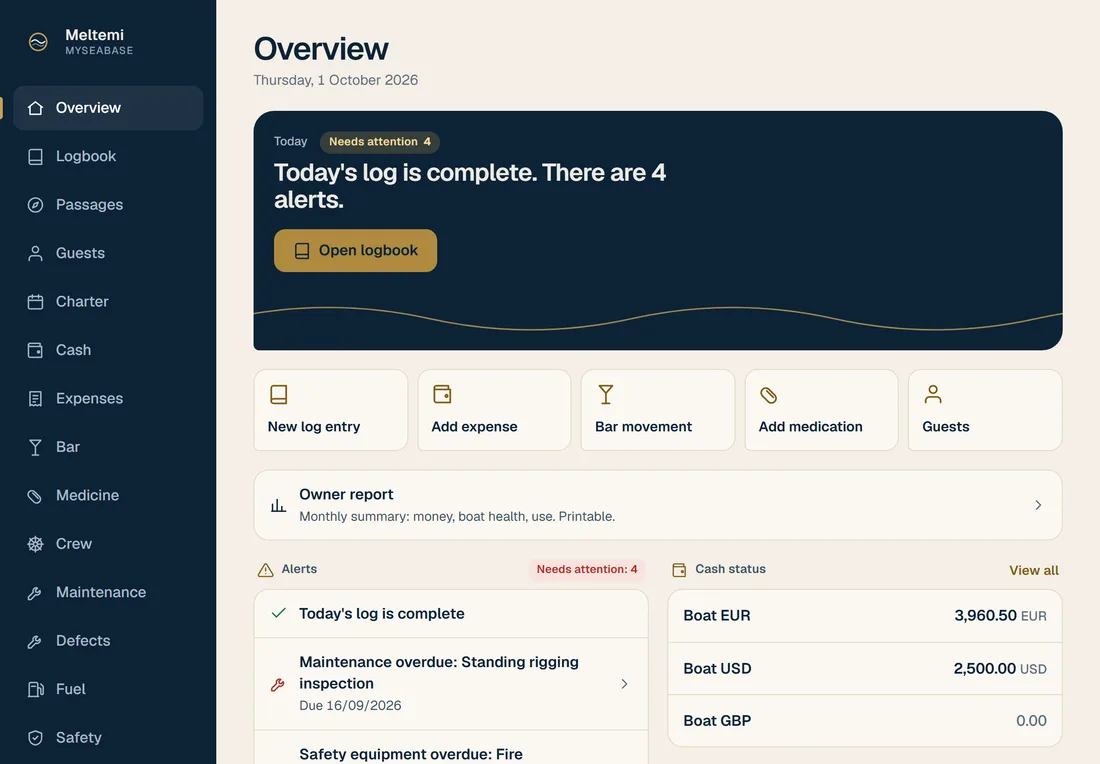
One app. One place to look. What needs attention today, first.

What is inside

The work aboard, kept in order.

  1. Daily log

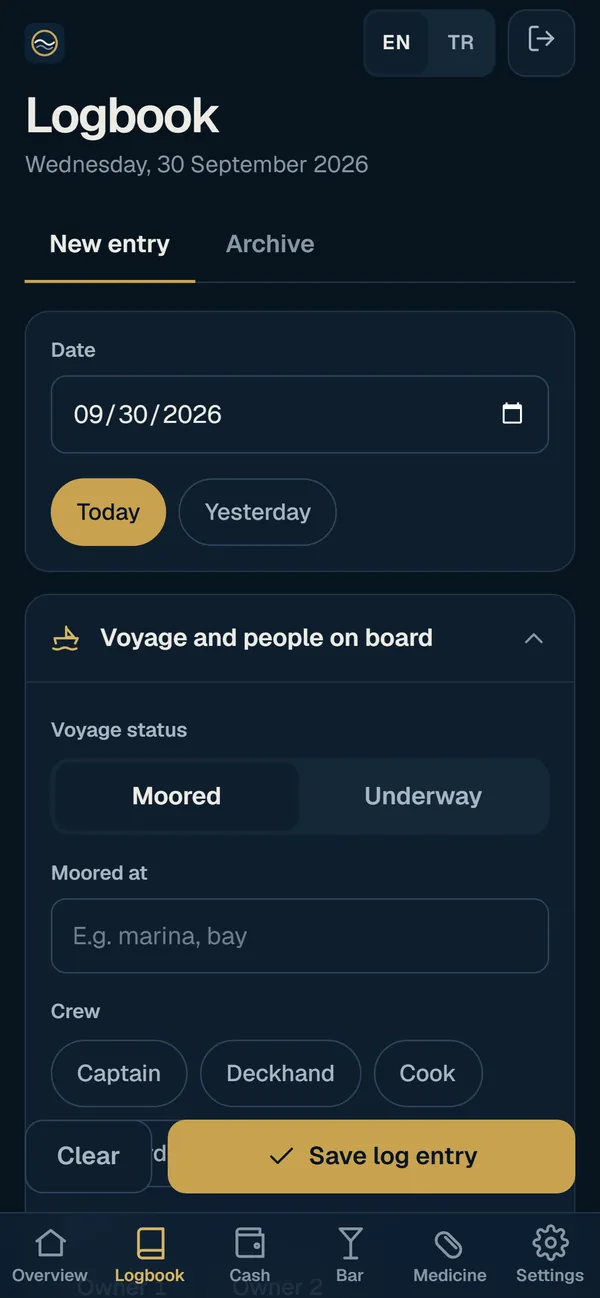
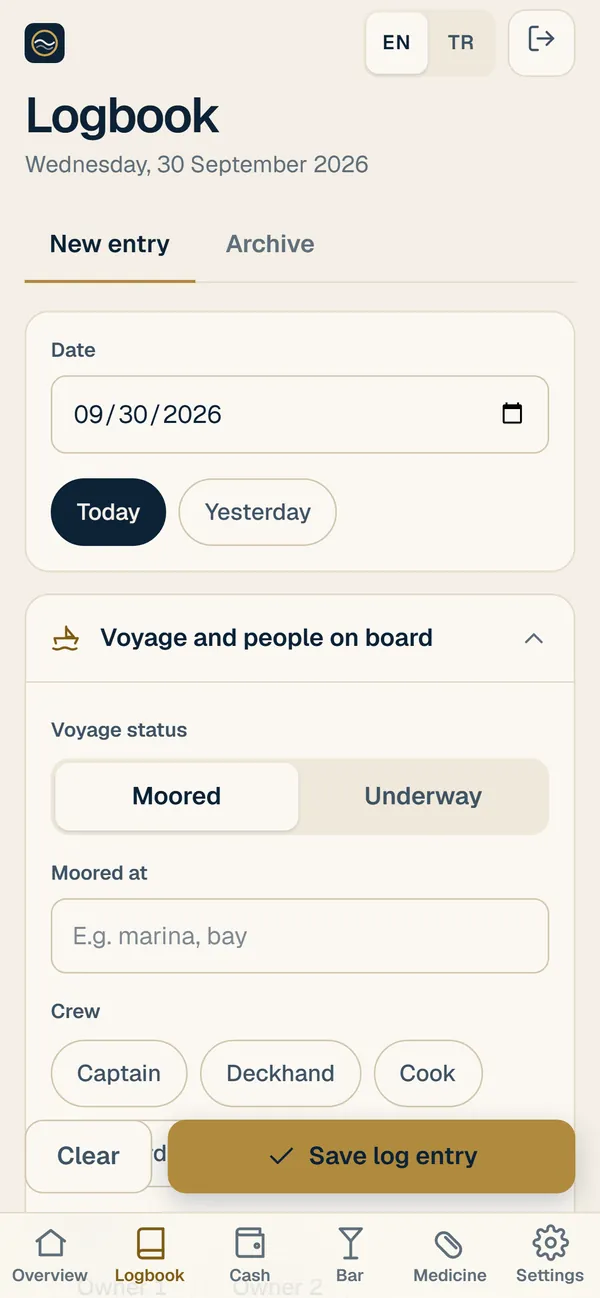
    Write the day as it happens. Your draft autosaves as you type, so a phone call or a lock screen never costs you the entry.

    Daily log screen
  2. Cash per currency

    Every currency you carry has its own balance. Record what comes in and goes out, and see what is left in each.

    Cash screen with a balance per currency
  3. Bar stock

    Know what is in the bar before the guests arrive, and what to restock before the next trip.

    Bar stock screen
  4. Medicine cabinet

    Every item with its expiry date. MySeaBase warns you before something runs out of date, not after.

    Medicine cabinet with expiry alerts
  5. Guest profiles

    Keep each guest's allergies, diet, preferences and birthday in one profile. Crew see a red allergy warning at the top, owner notes stay private, and you can turn a selection of guests into a trip briefing.

    Guest list with allergy flagsGuest profile with a red allergy banner
  6. Daily attention dashboard

    Open the app and the first screen tells you what needs you today: expiring items, maintenance coming due, low stock, what is still unlogged.

    Daily attention dashboard
  7. Admin settings and crew roles

    The owner or captain manages settings and accounts. Crew get their own sign-in with the access they need, and every account can add two-step login.

    Sign-in screen

For the captain

Less admin, more time on deck.

  • Receipts in two tapsPhotograph the receipt, enter the amount, send it for approval. You always see what the boat owes you.
  • Defects that get closedPhotos, a priority, the person it is assigned to, and every comment in one place until it is done.
  • Maintenance before it is dueService intervals by days or by engine hours. Mark a service done and the spares it used come off the stock.
  • The boat's knowledge stays aboardEvery engine, pump and watermaker with its serial number, warranty and manual. Spare parts stock, with a shopping list for what runs low.
  • Turnarounds without the scrambleArrival and departure checklists with photos. Guests send their preferences before they arrive, in their own language, and their allergies sit in front of the crew.

For the owner

The whole boat, quietly accounted for.

  • Approve before money is spentYard work orders carry their quotes, and the work starts once you approve. A haul-out project keeps its budget, so you see how much is already committed.
  • Claims approved, then reimbursedCrew claims wait for the owner or an admin. Approve, decline with a note, and reimburse from the cash box.
  • Where the money wentSpending by category against the year's budget, balances per currency, and a report to print or export as CSV.
  • Ready for the accountantChoose a period and export cash, expenses, fuel and charter income to Excel or CSV, with the receipts bundled and VAT shown per category.
  • A monthly letter from your boatOn the first of each month: spend against budget, what needs your attention, the boat's health and how she was used. In the app, on paper, or in your inbox.
  • A captain change without lost knowledgeA guided handover note and a signed state-of-the-boat pack: defects, service history, equipment, spares and paperwork, ready for the next captain.
  • Paperwork and safety kept currentBoat documents, crew certificates and safety equipment with their expiry and service dates, and reminders before anything lapses.
  • The season at a glanceCharter calendar with deposits, balances and occupancy. Every change keeps its history.

Made for iPhone and iPad

In your pocket on deck. On the big screen at the chart table.

MySeaBase dashboard on iPad
MySeaBase daily log on iPhone

MySeaBase is a web app that behaves like an app. Put it on the Home Screen and it opens full screen, with its own icon.

  1. Open the app in Safari. Go to the MySeaBase link.
  2. Tap Share. The square with the arrow.
  3. Add to Home Screen. Done. It opens like any other app.

Layouts adapt to iPhone and iPad, portrait and landscape. On iPhone, notifications arrive once the app is on the Home Screen.

For the captain

Built for the captain too.

The owner pays, the captain lives in it. So it has to save the captain time.

  • Daily entries in a couple of tapsThe log, a receipt, a defect: built to take a couple of taps, not a form to fill in. Reimbursed without chasing the owner.
  • Works with no signalWrite in a bay with no coverage. Entries are kept on the device and sent by themselves when the connection returns, once and only once.
  • The right alert, to the right personPush on the phone and email, with quiet hours or a single daily digest. Approvals go to whoever approves, not to the whole boat.
  • Passages and the anchor watchPlan a passage on a nautical map, record the GPS track into the logbook and keep an anchor watch. It is for planning and records: navigation stays with official charts and your instruments.
  • Hours of rest and the watch rotaRest recorded against MLC-style rules, with a warning when a limit is not met, and the rota beside it.
  • A working tool, not surveillanceThe log is the crew's working tool. It is there to save time and keep records, not to watch anyone.

Why boat owners use it

Made to stay out of your way.

  • Your data, kept apartEach boat has its own separate database on our EU server, reached only over an encrypted connection.
  • Simple enough for crewBig targets, plain words, one task per screen. No training day needed.
  • Light and darkFollows your phone: easy to read in a bright cockpit and on a night watch.
  • Nothing to juggleOne app in place of a notebook, a spreadsheet and a chat thread.
  • Your data belongs to the boat owner and can be exported.
  • Role-based access for owners, captains and crew.
  • Private guest notes are owner-only.
  • Nightly backups, kept for 30 days.

Two-step login protects every account. The records remain the owner's, and the accounts export to Excel or CSV straight from the app.

Why MySeaBase

Eight questions to ask before you choose.

Many boats run on a chat group and a spreadsheet; large yachts often buy superyacht software. MySeaBase puts the whole boat in one calm app, priced per boat.

Eight questions, three ways to run a boat. The middle column describes superyacht software as a category, not any one product.
The questionWhatsApp + ExcelSuperyacht softwareMySeaBase
Works with no signal at sea No: Messages wait for signal, and nothing is structured Partly: Often one function only, or an onboard server to install Yes: The whole app, sent once and only once when signal returns
The owner sees and approves spending No: An approval is a chat message, easy to lose Yes: Usually, often as part of a larger package Yes: Crew claims and yard quotes wait for the owner's approval Owner and Private Fleet
Receipts and expenses in one place, ready for the accountant Partly: Photos in the chat, totals typed into a sheet Yes: Usually, sometimes as a separate module Yes: Receipt photos, VAT per category, Excel or CSV export Owner and Private Fleet
Maintenance, defects and document expiry remind you No: Only if someone remembers Yes: Usually the core of the product Yes: By date or engine hours, with push alerts and a daily list
Charter and guests: APA with a guest balance page, pre-arrival form No: A separate sheet, and forms by email Partly: Varies by product and package Yes: Guest balance page and pre-arrival form, no login, six languages Owner and Private Fleet
Safety management: checklists, drills, incident reports, audit pack Partly: Paper binders and photos of signed sheets Yes: Often available, sometimes as an extra module Yes: ISM-style checklists, drills log, reports, an audit pack to print Owner and Private Fleet
A clear price, and you can start this week Yes: Free, and already on every phone No: Usually price on request, with installation and training Yes: Price per boat on this page, nothing to install, a demo to try today
Your data stays yours, and private Partly: Spread over personal phones and accounts Partly: Varies: ask where it is hosted and who can see it Yes: One database per boat, two-step login, nightly backups, no trackers
Try the demo boat

Sample data, nothing is saved to a server.

Compare all features 58

Everything that is live today, in nine groups, against the same three ways of running a boat. Open a group to see its features.

Daily work 10
Daily work
FeatureWhatsApp + ExcelSuperyacht softwareMySeaBase
Logbook Write the day as it happens; the draft saves itself as you type. Partly: On paper Yes: Usually Yes: Every plan
Daily attention dashboard The first screen shows what needs you today: expiries, service due, low stock. No: No Partly: Often Yes: Every plan
Cash per currency A balance for every currency aboard, money in and money out. Partly: In a spreadsheet Yes: Usually Yes: Every plan
Fuel, water and waste tanks Levels, fills and consumption, logged. Partly: In a spreadsheet Yes: Usually Yes: Every plan
Bar stock What is in the bar, and what to restock before the next trip. Partly: In a spreadsheet Partly: Often Yes: Every plan
Medicine cabinet Every item with its expiry date, and a warning before it runs out of date. Partly: On paper Partly: Often Yes: Every plan
Spare parts and shopping list Spares stock by location, with a shopping list for what runs low. Partly: In a spreadsheet Yes: Usually Yes: Every plan
QR labels and phone scanning Print labels for spares, equipment, safety gear, bar and medicine; scan to use, count or restock. No: No Partly: Often Yes: Every plan
Stocktake and barcode lookup Count the stores by scanning, then confirm once; manufacturer barcodes are recognised. Partly: By hand Partly: Often Yes: Every plan
Edit history with undo Every change kept with who and when, and a mistake can be undone. Partly: Varies Yes: Usually Yes: Every plan
At sea with no signal 5
At sea with no signal
FeatureWhatsApp + ExcelSuperyacht softwareMySeaBase
The whole app works offline It opens, shows what it last loaded and keeps everything you enter. Partly: Scattered in the chat Partly: Often needs an onboard server Yes: Every plan
Sent once, and only once Entries go out by themselves when signal returns, never booked twice. No: No Partly: Varies Yes: Every plan
Get ready to go offline Download what you will need before you leave the marina. No: No Partly: Varies Yes: Every plan
Stay signed in at sea Remember your own phone or tablet for 14 days, revocable at any time. Partly: Depends on each phone Partly: Varies Yes: Every plan
Passages, GPS track and anchor watch Plan on a nautical map, record the track into the log, keep an anchor watch. For planning and records, not navigation. No: No Partly: Often Yes: Every plan
Money and approval 6
Money and approval
FeatureWhatsApp + ExcelSuperyacht softwareMySeaBase
Crew claims with receipt photos Photograph the receipt, enter the amount, send it for approval. Partly: Scattered in the chat Yes: Usually Yes: Owner and Private Fleet
Approval and reimbursement The owner or an admin approves or declines with a note, then reimburses from the cash box. Partly: Scattered in the chat Yes: Usually Yes: Owner and Private Fleet
Budgets and spending reports Spending by category against the year's budget, to print or export. Partly: In a spreadsheet Yes: Usually Yes: Owner and Private Fleet
Yard work orders Quotes are approved before the work starts. Partly: Scattered in the chat Yes: Usually Yes: Owner and Private Fleet
Haul-out budgets A project keeps its budget, so you see how much is already committed. Partly: In a spreadsheet Partly: Often Yes: Owner and Private Fleet
Accountant export Excel or CSV for any period, receipts bundled, VAT per category. Partly: By hand Yes: Usually Yes: Owner and Private Fleet
Maintenance and safety 9
Maintenance and safety
FeatureWhatsApp + ExcelSuperyacht softwareMySeaBase
Maintenance by days or engine hours Mark a service done and the spares it used come off the stock. Partly: In a spreadsheet Yes: Usually Yes: Every plan
Defect list with photos Priority, the person it is assigned to and every comment, until it is closed. Partly: Scattered in the chat Yes: Usually Yes: Every plan
Equipment register Every engine, pump and watermaker with serial number, warranty and manual. Partly: In a spreadsheet Yes: Usually Yes: Every plan
Safety equipment Service and expiry dates, with reminders before anything lapses. Partly: On paper Yes: Usually Yes: Every plan
Boat documents Registration, insurance and certificates, with expiry reminders. Partly: On paper Yes: Usually Yes: Every plan
Safety checklists ISM-style checklists from a starter library, signed and countersigned; a failed item becomes a defect in one tap. Partly: On paper Partly: Often a separate module Yes: Owner and Private Fleet
Drills log MOB, fire and abandon-ship drills on a schedule, with overdue alerts. Partly: On paper Partly: Often a separate module Yes: Owner and Private Fleet
Near miss and incident reports Near misses, incidents and non-conformities, with corrective actions and captain review. Partly: On paper Partly: Often a separate module Yes: Owner and Private Fleet
Audit pack The safety records as an A4 print and a ZIP of CSV files. Partly: By hand Partly: Often Yes: Owner and Private Fleet
Charter and guests 7
Charter and guests
FeatureWhatsApp + ExcelSuperyacht softwareMySeaBase
Guest profiles Allergies, diet, preferences and birthdays; crew see a red allergy warning first. Partly: Scattered in the chat Partly: Often Yes: Owner and Private Fleet
Trip briefings Turn a selection of guests into a briefing for the crew. Partly: By hand Partly: Often Yes: Owner and Private Fleet
Guest pre-arrival form A link the guest opens without an account, in six languages. Partly: By hand Partly: Varies Yes: Owner and Private Fleet
Charter calendar Deposits, balances, arrival and departure checklists, occupancy. Partly: In a spreadsheet Yes: Usually Yes: Owner and Private Fleet
Charter APA Money received and top-ups, spending with receipts in any currency, low balance alerts. Partly: In a spreadsheet Partly: Often Yes: Owner and Private Fleet
Guest balance page A read-only page the guest opens without an account, in six languages. No: No Partly: Varies Yes: Owner and Private Fleet
APA closing statement On screen, A4 or CSV, with the refund or the extra payment, then locked. Partly: By hand Partly: Often Yes: Owner and Private Fleet
Crew 5
Crew
FeatureWhatsApp + ExcelSuperyacht softwareMySeaBase
Roles for owner, captain and crew Everyone signs in with their own account; crew pay is visible only to the owner and admins. No: No Yes: Usually Yes: Every plan
Users per boat Up to 5 on Crew, unlimited on Owner and Private Fleet. Yes: Yes Partly: Varies Yes: By plan
Crew records Certificates with expiry dates, and leave. Partly: In a spreadsheet Yes: Usually Yes: Owner and Private Fleet
Hours of rest and watch rota Rest recorded against MLC-style rules, with a warning when a limit is not met. Partly: In a spreadsheet Yes: Usually Yes: Owner and Private Fleet
Captain handover pack A guided handover note and a signed state-of-the-boat pack for the next captain. Partly: By hand Partly: Varies Yes: Owner and Private Fleet
Owner reports and statistics 3
Owner reports and statistics
FeatureWhatsApp + ExcelSuperyacht softwareMySeaBase
Owner monthly report Spend against budget, what needs attention and how the boat was used: in the app, on paper or by email. Partly: By hand Partly: Often Yes: Owner and Private Fleet
Statistics Any date range: days underway and in port, cost per outing, fuel per mile, places, guests, charter. Partly: In a spreadsheet Partly: Often Yes: Owner and Private Fleet
Owner-only notes Private guest notes that only the owner sees. No: No Partly: Varies Yes: Owner and Private Fleet
Security and accounts 5
Security and accounts
FeatureWhatsApp + ExcelSuperyacht softwareMySeaBase
Two-step login For every account, with recovery codes. Partly: Depends on each phone Partly: Often Yes: Every plan
One database per boat Your boat's records are never mixed with another boat's. No: No Partly: Varies Yes: Every plan
Nightly backups Every boat's records and attachments, kept for 30 days. No: No Yes: Usually Yes: Every plan
Your data, exportable The accounts export to Excel or CSV from the app; everything else on request. Yes: Yes Partly: Varies Yes: Every plan
No trackers No advertising or analytics scripts in the app or on this page. Partly: Varies Partly: Varies Yes: Every plan
Platform 8
Platform
FeatureWhatsApp + ExcelSuperyacht softwareMySeaBase
iPhone, iPad and computer Add it to the Home Screen and it opens full screen; any modern browser works. Yes: Yes Partly: Varies Yes: Every plan
Notifications Push on the phone and email, with quiet hours or a daily digest. Partly: Scattered in the chat Yes: Usually Yes: Every plan
Light and dark Easy to read in a bright cockpit and on a night watch. Yes: Yes Partly: Varies Yes: Every plan
English and Turkish The app in both languages; guest pages in six. Yes: Yes Partly: Varies Yes: Every plan
Storage for photos and documents 1 GB on Crew, 5 GB on Owner, 20 GB per boat on Private Fleet; 10 GB more for €99 a year. Partly: Depends on each phone Partly: Varies Yes: By plan
Several boats, one sign-in A fleet account moves between boats; your own branding. No: No Yes: Usually Yes: Private Fleet
Price Published, per boat, per year; personal onboarding included. Yes: Free No: Price on request Yes: Every plan
Getting started Nothing to install: try the demo boat, then set up on a call. Yes: Yes Partly: Often with training days Yes: Every plan

Pricing

One price per boat, per year.

Annual billing only. Prices in euros, per boat, excluding VAT.

For a working crew

Crew

€990 per boat, per year

1 boat, up to 5 users

  • Logbook with draft autosave
  • Cash per currency
  • Bar stock
  • Medicine cabinet with expiry alerts
  • Defect list with photos
  • Fuel, water and waste tanks
  • Maintenance by days or engine hours
  • Safety equipment and boat documents, with reminders
  • Equipment register with manuals and warranties
  • Spare parts stock and a shopping list
  • QR labels and phone scanning, with stocktake and barcode lookup
  • Passage plans, GPS track and anchor watch
  • Works offline at sea, syncs on return
  • Push and email notifications, with quiet hours
  • Two-step login
  • Edit history with undo
  • Daily attention dashboard
  • Eight languages: English, Turkish, Greek, Croatian, Italian, Spanish, German, French
  • 1 GB storage for photos, receipts and documents
  • Email support
Book a call

Recommended

Owner

€2,490 per boat, per year

Everything in Crew, plus:

  • Unlimited users
  • Guest profiles with allergies and trip briefings
  • Charter calendar with deposits and checklists
  • Charter APA with a guest balance page
  • Guest pre-arrival form in six languages
  • Crew records, certificates and leave
  • Crew hours of rest and watch rota
  • Expense approval and reimbursement, with budgets and reports
  • Yard work orders, quotes approved before work starts, haul-out budgets
  • Accountant export: Excel or CSV, receipts, VAT per category
  • Safety management: checklists, drills, incident reports and an audit pack
  • Statistics: a management report for any date range
  • Owner monthly report on the first of each month
  • Captain handover pack
  • Owner-only notes
  • 5 GB storage for photos, receipts and documents
  • Priority support
  • Personal onboarding: we set up your lists, documents and service calendar with you
Book a call

For several boats

Private Fleet

from €4,900 per year

Let's talk.

  • Multiple boats
  • Your own branding
  • Priority direct line
  • Data migration
  • Fleet view: one sign-in for every boat
  • Statistics, charter APA and safety management on every boat
  • 20 GB storage per boat
Book a call

Billed annually. Prices exclude VAT.

Extra storage: 10 GB more for €99 a year, on any plan. Moving to a smaller plan never deletes a file.

Refer a boat: every boat has its own referral code in Settings. When a boat you refer pays its first year, you earn 10% of that invoice as credit on your next one.

Haul-out season setup: start over the winter and we set your boat up with you; billing begins on 1 April.

Early access: onboarding boats now. MySeaBase is opening to its first boats, so every start is a personal one.

Free trial

Try it on your own boat.

30 days free, set up for your own boat, lists and crew. No card and nothing billed.

The role you choose sets the modules you start with: an owner or a manager gets the Owner plan, a captain the daily-use set. More can be switched on at any time.

Questions

Short answers.

Does it work offline?

Yes. With no signal the app still opens, shows what it last loaded, and keeps what you enter on the device. When the connection returns, everything is sent automatically, and nothing is booked twice.

Where is my data stored?

On our own server in a Hetzner data centre in Helsinki, Finland, inside the EU. Each boat has its own separate database, and every connection is encrypted. Drafts are also kept on your own device until you save them.

Can crew have separate logins?

Yes. Every person signs in with their own role: admin, owner or crew. Admins manage accounts and settings, and crew pay is visible only to the owner and admins.

Which languages does it speak?

English, Turkish, Greek, Croatian, Italian, Spanish, German and French, and everyone on board picks their own. The guest pre-arrival form speaks English, Turkish, German, French, Italian and Russian.

How does billing work?

Billing is annual only, per boat, in euros and excluding VAT. Book a call and we agree the start date together.

Who owns my data?

The boat owner. Your records are yours: the accounts export to Excel or CSV from the app, and we export everything else on request.

What happens at renewal time?

You get reminders before your year ends. Nothing is deleted.

How many crew logins do I get?

Crew: up to 5 users on one boat. Owner: unlimited users. Private Fleet: set up to fit your boats.

Can I navigate with it?

It is for planning and records, not a chartplotter. Plan passages, record the track and keep an anchor watch in MySeaBase, and navigate with official charts and your instruments.

How do notifications reach me?

As push on the phone and by email, each person choosing what they receive, with quiet hours or a daily digest. On iPhone, push works once MySeaBase is added to the Home Screen.

Everything aboard, in order.

Early access: onboarding boats now. Tell us about your boat and we will set up a start together.